
Vox Seas Inventory and Fruit Storage
Use the Vox Seas inventory to manage equipment, put tools on your hotbar, and retrieve stored physical fruits.
Open CHARACTER → Inventory to equip items or unstore a fruit. To store a physical fruit, select it from your hotbar and choose STORE. Inventory slots and fruit storage have separate expansion products, while the Banker keeps items safe for a small fee.
Inventory Categories and Equipment Slots
Open CHARACTER → Inventory to browse your items. Use the left and right arrows to switch categories, and scroll down to see more items.
- Categories: ALL, Fruits, Swords, Guns, Tools, Hats, Necklaces, Capes, Rings, Belts, and Boots.
- Equipment slots: Hat, Cape, Style, Sword, Gun, Fruit, Amulet, two Ring slots, Belt, and Boots.
The capacity counter shows occupied inventory space over the limit.
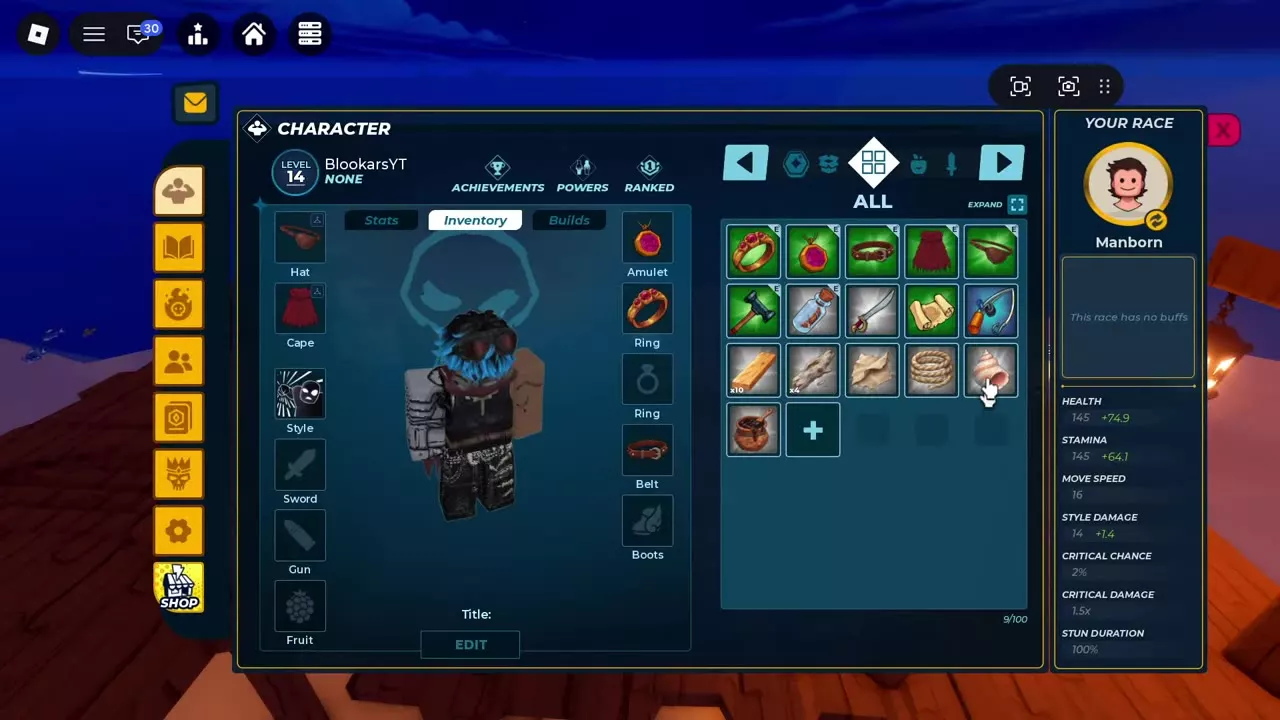
Equip, Unequip and Hotbar Tools
- Open CHARACTER → Inventory and find an item you own.
- Hover over it to read its name, category, and description. Select it to open its details, including rarity and effects.
- Choose EQUIP to equip it, or UNEQUIP to remove an equipped item. An equipped inventory icon can have an E marker.
Equipping a replacement puts the previous item back in the inventory and places the new item in its equipment slot. Lock and delete icons sit beside the item action.
To add a Boat, Shipwright's Hammer, Fishing Rod, or Navigator's Map to your hotbar, select each item in Inventory and choose EQUIP.
Store and Unstore Physical Fruits
Store a fruit
- Select the physical fruit from your hotbar to open its action menu.
- Choose STORE to put it in storage.
The same menu offers EAT, DROP, and CLOSE. Eating a fruit replaces your current fruit power; choose STORE when you want to keep the physical fruit for later. See fruit use and replacement for the effects of eating one.
Unstore a fruit
- Open CHARACTER → Inventory.
- Select the stored fruit and choose UNSTORE.
A permanent fruit card's EQUIP action is separate from storing or unstoring a physical fruit.

Capacity and Banker Safekeeping
Inventory has an Expand entry. In SHOP → Products, choose the expansion for the space you need:
- +1 Inventory Slot: 50 Robux for one permanent inventory slot per purchase.
- +1 Fruit Storage: 300 Robux for storage for one additional fruit or valuable item per purchase.
The Banker provides item safekeeping for a small fee.
Equipment and Shop Products
- Check accessory levels and equipment requirements before choosing gear.
- See accessory appearance and Vox Armor colors for visual options.
- Browse shop products and prices for other purchases.