
Vox Seas Vox Armor Colors and Accessory Appearance
Browse Vox Armor colors in Vox Seas and customize how your hat and cape appear on your character.
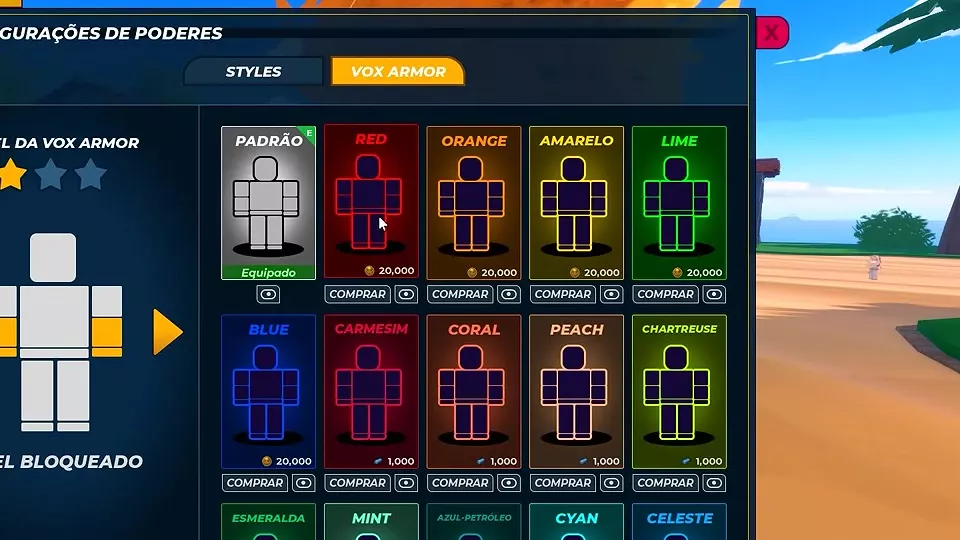
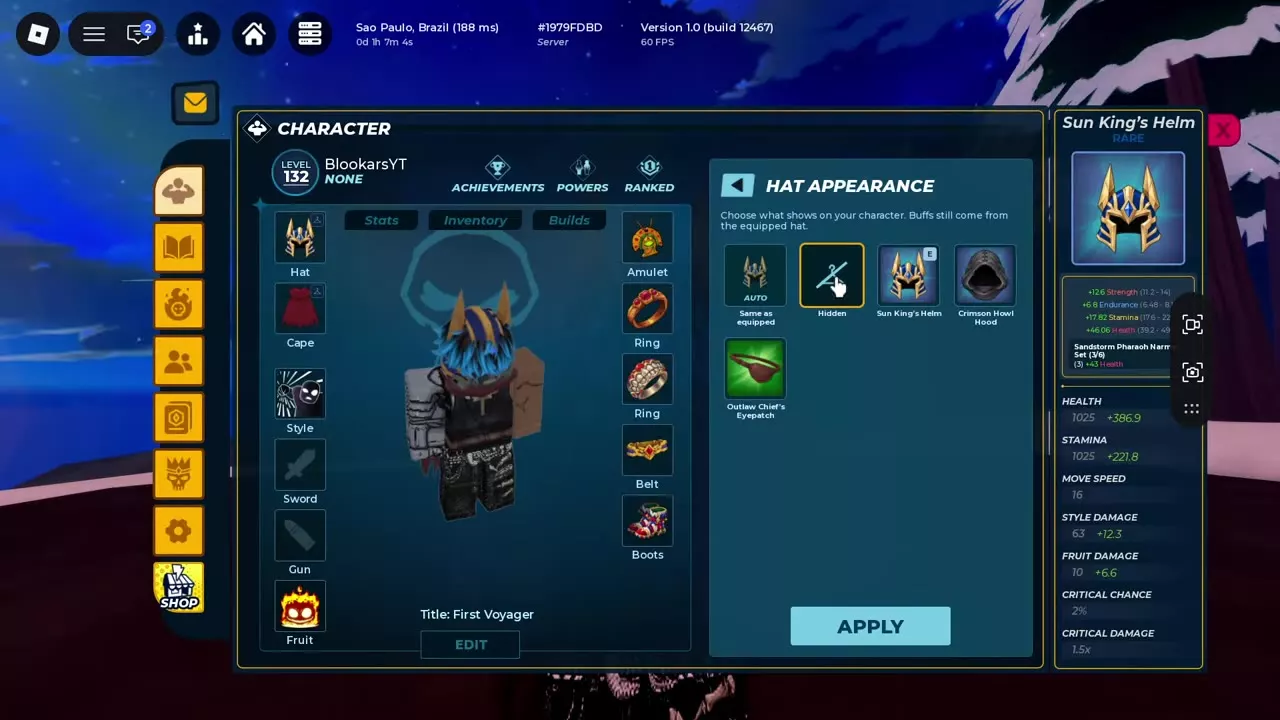
Open Character > Powers > Vox Armor to preview and buy colors. For hats and capes, choose an appearance in Character > Inventory and select Apply; bonuses still come from the equipped item.
Armor Colors and Equipment Appearance
Vox Armor colors change the appearance of the ability. Hat Appearance and Cape Appearance are separate Inventory controls for what your character wears visually; the equipped hat or cape continues to provide its bonuses.
Vox Armor Color Directory
Compare the appearances and their listed prices below. Prices use either Coins or the currency shown with a blue icon.
Browse Vox Armor appearances and their listed purchase prices.
30 objects
|
|
— |
|---|---|
|
The default Vox Armor appearance.
|
|
|
|
20,000 Coins |
|
A selectable Vox Armor color.
|
|
|
|
20,000 Coins |
|
A selectable Vox Armor color.
|
|
|
|
20,000 Coins |
|
A selectable Vox Armor color.
|
|
|
|
20,000 Coins |
|
A selectable Vox Armor color.
|
|
|
|
20,000 Coins |
|
A selectable Vox Armor color.
|
|
|
|
1,000 blue-icon currency |
|
A selectable Vox Armor color.
|
|
|
|
1,000 blue-icon currency |
|
A selectable Vox Armor color.
|
|
|
|
1,000 blue-icon currency |
|
A selectable Vox Armor color.
|
|
|
|
1,000 blue-icon currency |
|
A selectable Vox Armor color.
|
|
|
|
1,000 blue-icon currency |
|
A selectable Vox Armor color.
|
|
|
|
1,000 blue-icon currency |
|
A selectable Vox Armor color.
|
|
|
|
1,000 blue-icon currency |
|
A selectable Vox Armor color.
|
|
|
|
1,000 blue-icon currency |
|
A selectable Vox Armor color.
|
|
|
|
1,000 blue-icon currency |
|
A selectable Vox Armor color.
|
|
|
|
2,500 blue-icon currency |
|
A selectable Vox Armor appearance.
|
|
|
|
2,500 blue-icon currency |
|
A selectable Vox Armor appearance.
|
|
|
|
2,500 blue-icon currency |
|
A selectable Vox Armor appearance.
|
|
|
|
2,500 blue-icon currency |
|
A selectable Vox Armor appearance.
|
|
|
|
2,500 blue-icon currency |
|
A selectable Vox Armor appearance.
|
|
|
|
2,500 blue-icon currency |
|
A selectable Vox Armor appearance.
|
|
|
|
2,500 blue-icon currency |
|
A selectable Vox Armor appearance.
|
|
|
|
2,500 blue-icon currency |
|
A selectable Vox Armor appearance.
|
|
|
|
2,500 blue-icon currency |
|
A selectable Vox Armor appearance.
|
|
|
|
2,500 blue-icon currency |
|
A selectable Vox Armor appearance.
|
|
|
|
— |
|
A selectable Vox Armor appearance.
|
|
|
|
— |
|
A selectable Vox Armor appearance.
|
|
|
|
— |
|
A selectable Vox Armor appearance.
|
|
|
|
— |
|
A selectable Vox Armor appearance.
|
|
|
|
— |
|
A selectable Vox Armor appearance.
|
|
Preview and Buy a Color
- Open Character, select Powers, and choose Vox Armor.
- Scroll through the color cards and select the eye icon on a card to preview its appearance.
- Select Buy on the desired card to purchase it at the displayed price.
Hide or Replace a Hat or Cape
- Open Character > Inventory, then enter Hat Appearance or Cape Appearance.
- Choose Hidden to hide that slot, Auto / Same as equipped to display the equipped item, or an available named appearance.
- Select Apply to save the choice.
Hat choices include Sun King's Helm, Crimson Howl Hood, and Outlaw Chief's Eyepatch; Outlaw's Cape is a cape appearance. For example, you can hide Sun King's Helm while keeping it equipped and retaining its bonuses.
Armor Training and Accessories
- Unlock Vox Armor to gain the ability.
- Browse accessories and equipment requirements for equipment slots, levels, and bonuses.